
DOCS / Questions and support
Troubleshooting
Diagnose sign-in, start, connection, IP change, stop, and top-up problems by User Center state.
You can solve most sign-in and connection problems with the steps below. First find the section that matches your current page state, then check the items in order. If you still need help, record the time and the page message, then submit a ticket.
Choose the correct help channel
Do not send page screenshots, complete errors, or entrance addresses in a public group. Submit a ticket in My Tickets in the User Center with the template, or create a private KOOK ticket, and submit the material without changes. Do not submit passwords, redeem codes, sign-in codes, tokens, cookies, or NFA credentials.
I cannot sign in to the User Center
QQ code sign-in
- Generate a new one-time code on the sign-in page.
- Send the complete command yourself, from the matching QQ account.
- Confirm that the bot is online, and use the command prefix or @ that your platform requires.
- If the code expired or was used, generate it again on the page.
Password sign-in
- Use your set username or email address, not a chat-platform nickname.
- Select the browser verification and wait until it succeeds, then select Sign in.
- If you forgot the password, follow the reset steps with your verified numeric QQ number.
- The live sign-in page shows whether registration is open.
Passkey sign-in
A passkey must first be added on the Account page and stored in the current browser or system. If it is temporarily unavailable, sign in with a password or QQ first, then check the Account page again.
The start button is unavailable, or the start fails
Check in order:
- Does the page show a maintenance announcement, or is the start function temporarily closed?
- Are the selected service, target, and entrance still in the current list? A service card states the reason when it is unavailable.
- Does the account have an eligible subscription or enough Service Point?
- When you select platform AutoNFA, does the current service support it, and does it have stock?
- Is a start, IP change, or stop operation still processing?
Services, targets, stock, and prices update in real time. After an operation starts processing, wait for the page result. Do not submit repeatedly.
The page shows a started session, but the game cannot connect
- Confirm that the start completed and session control shows the running state, not preparation or a route change.
- Copy the entrance address from the current session again. Do not use an old screenshot or a previous address.
- Check the Minecraft version and the target server address.
- When you use your own account, confirm that the launcher sign-in is still valid.
- Read the route status below the entrance, but do not treat a single latency value as a recommendation.
- Record the complete client error text, then try one IP change.
If you still cannot connect, test a direct connection to the target server. Report the result when you ask for help. This helps us separate local network, target server, and route problems faster.
AutoNFA preparation fails
- Confirm that you selected the platform NFA option, and the page still shows stock and the current price.
- A Minecraft client earlier than 1.20 must sign in to any purchased account that you own in the launcher.
- Wait for the final result of the current operation. Do not start repeatedly during preparation.
- If the NFA itself cannot be used and meets the refund rules, NFA Coin returns automatically. You do not need to give a platform account password.
Ordinary disconnections and server penalties caused by player behavior do not qualify for an automatic refund. See Platform AutoNFA.
The page still shows the old state after an IP change
An IP change needs time for the new route to become active. Keep waiting while the page processes. After the operation completes, refresh the acceleration status, copy the entrance address again, then connect.
I cannot stop acceleration
For two minutes after you successfully join a server and billing starts, you may not be able to stop the service. Follow the page instruction and try again later. If a start is still processing, selecting Stop tries to cancel the start first.
A game disconnection does not stop billing. When you no longer need the service, stop it yourself in the User Center. Automatic stop happens only after about 20 minutes offline.
Latency shows no data
No data only means that no route information is available for reference. It does not affect normal use. It is also normal for some entrances to show the same result.
Balance did not update after a top-up
Open the recent orders list on the Account page and use the self-service check to confirm the order status and payment channel. Do not create a duplicate order. If the balance still does not arrive, submit the order number, payment time, and payment proof in My Tickets in the User Center.
Media binding or submission fails
- Binding information is valid for 10 minutes. Send the private message without changes.
- After sending, return to the page and start the check manually.
- Submissions accept only videos published in the last seven days that belong to the bound account.
- Submitting the same video again does not add another count.
See Media program for the steps.
Still not solved
In My Tickets in the User Center, select New ticket, copy the problem template, and fill in each item:
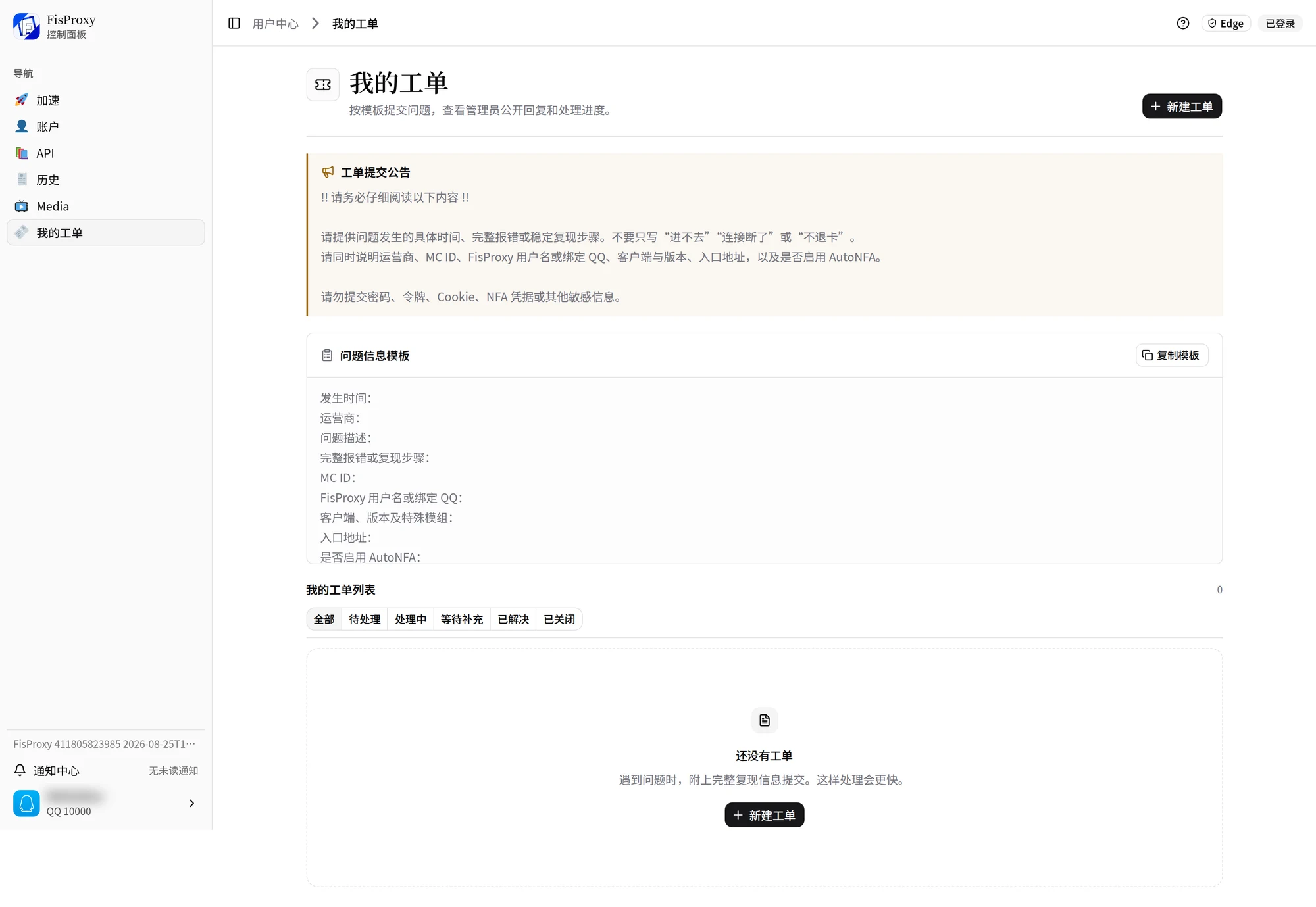
- The time, your ISP, and a problem description.
- The complete error or stable reproduction steps. Do not write only "cannot join" or "disconnected".
- Your MC ID, and your FisProxy username or bound QQ.
- The client, version, and special mods.
- The entrance address, and whether AutoNFA was enabled.
- What you already tried.
You can also create a private ticket in the KOOK channel from Contact us and submit the same material without changes. Do not submit passwords, redeem codes, sign-in codes, tokens, cookies, or NFA credentials.
NEXT / KEEP EXPLORING
Continue to explore.