
DOCS / User guide
Platform AutoNFA
Use a platform NFA in one action. Learn about the free first use, reusing a previous NFA, client versions, and cost rules.
Platform AutoNFA prepares a usable Minecraft NFA for the current connection. You do not need to prepare an account first. Select the platform NFA option when you start acceleration, and FisProxy completes the remaining steps.
You can switch back to your own account at any time. The page shows whether each service supports AutoNFA, the current stock, and the required NFA Coin.
The two charges are separate
Acceleration uses a subscription or Service Point. Platform AutoNFA uses NFA Coin. Using your own account does not deduct NFA Coin.
Three ways to use an account
| Method | Suitable when | NFA Coin |
|---|---|---|
| Your own account | You prepare a purchased account and sign in to it in the Minecraft launcher first | No deduction |
| Platform NFA | You want the platform to prepare an NFA for this connection | As shown on the page |
| Reuse a previous NFA | You want to use a previous NFA that is not banned and remains available | No deduction for this session |
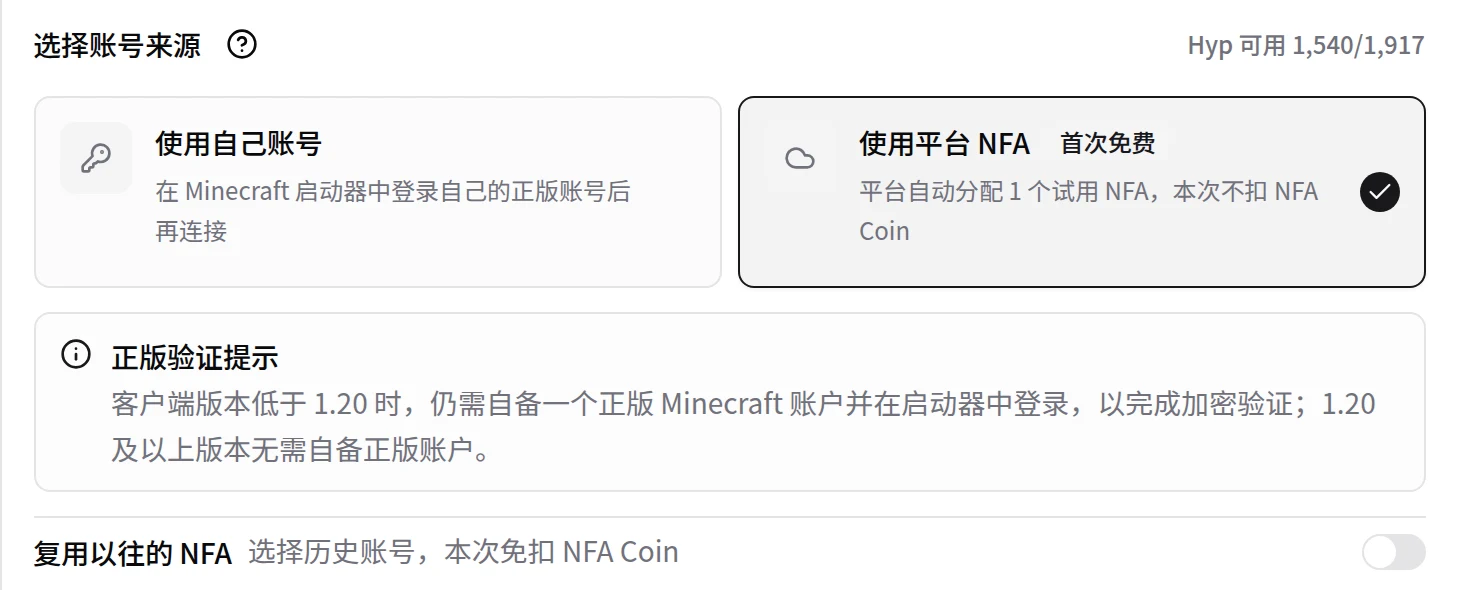
Not every service offers platform AutoNFA. If the page does not show this option, use your own account, or select a service that supports AutoNFA.
First use is free
Each user has one free AutoNFA trial. When you first successfully use a new NFA from the platform, that session does not deduct NFA Coin.
- The free trial is used only after the NFA is ready and can be used for the session.
- A failed start or an NFA that is not ready does not use the trial.
- Reusing a previous NFA is free and does not use the free first-use trial.
- An account merge does not give another free trial.
Before you submit a start, the page shows whether the session is free and the NFA Coin it requires.
Reuse a previous NFA
Do you want to continue with the same player identity? For a Hypixel connection, turn on the reuse switch and select a previous account. You can continue with a previous NFA that is not banned and remains available. The session does not deduct NFA Coin or use your free first-use trial.
The page checks whether the previous NFA remains available. If it is banned or temporarily unavailable, the option does not appear. If the previous NFA cannot be used, reuse fails directly and does not deduct NFA Coin.
Client version requirements
When you use platform AutoNFA, prepare according to your Minecraft client version:
- Minecraft 1.20 or later: You do not need to sign in to your own purchased account in the launcher.
- Earlier than Minecraft 1.20: First sign in to any purchased Minecraft account that you own in the launcher, to complete the encryption verification.
The purchased account in an older launcher does not change the platform NFA for this session. If connection authentication fails, check the client version and the launcher sign-in state first.
Free quota for non-Hypixel servers
Each time NFA Coin successfully obtains a Hypixel platform NFA, you receive three free AutoNFA uses for other supported servers. When uses remain, the session does not deduct NFA Coin. The page shows the remaining uses.
Unused gifted uses remain valid for three Asia/Shanghai calendar days, including the day you receive them. They expire on the fourth day.
Stock and prices can differ by service. FisProxy shows the current result before you start. You do not need to remember a fixed price or server list.
Use a skin that you like
In the AutoNFA skin preference area on the Account page, enter a purchased Minecraft player name or UUID to set a preferred official skin source. The system tries to apply this skin when you use platform AutoNFA.
A failed skin change does not affect the start. The skin usually appears at the next game login. See Account and security for the steps.
Connection failure and refunds
If a platform NFA itself cannot be used and meets the refund rules, NFA Coin returns automatically. Check the result in balance records.
These cases usually do not qualify for an NFA Coin refund:
- Ordinary network instability or temporary disconnection.
- A server kick when the current NFA itself is not confirmed as the cause.
- A server penalty caused by player behavior.
- A problem after the NFA worked normally.
- A skin that did not apply.
- A free first use or a reused NFA session that did not deduct NFA Coin.
When a problem occurs, first review the acceleration status and balance records. If NFA Coin did not return automatically but you think the session meets the refund rules, submit the acceleration time and complete error details in My Tickets in the User Center, or follow Contact and support.
Learn more
NEXT / KEEP EXPLORING
Continue to explore.