
DOCS / User guide
Subscriptions, pay-as-you-go, and NFA Coin
Learn how subscriptions, Service Point, and NFA Coin work, including billing times, redemption, top-ups, and refunds.
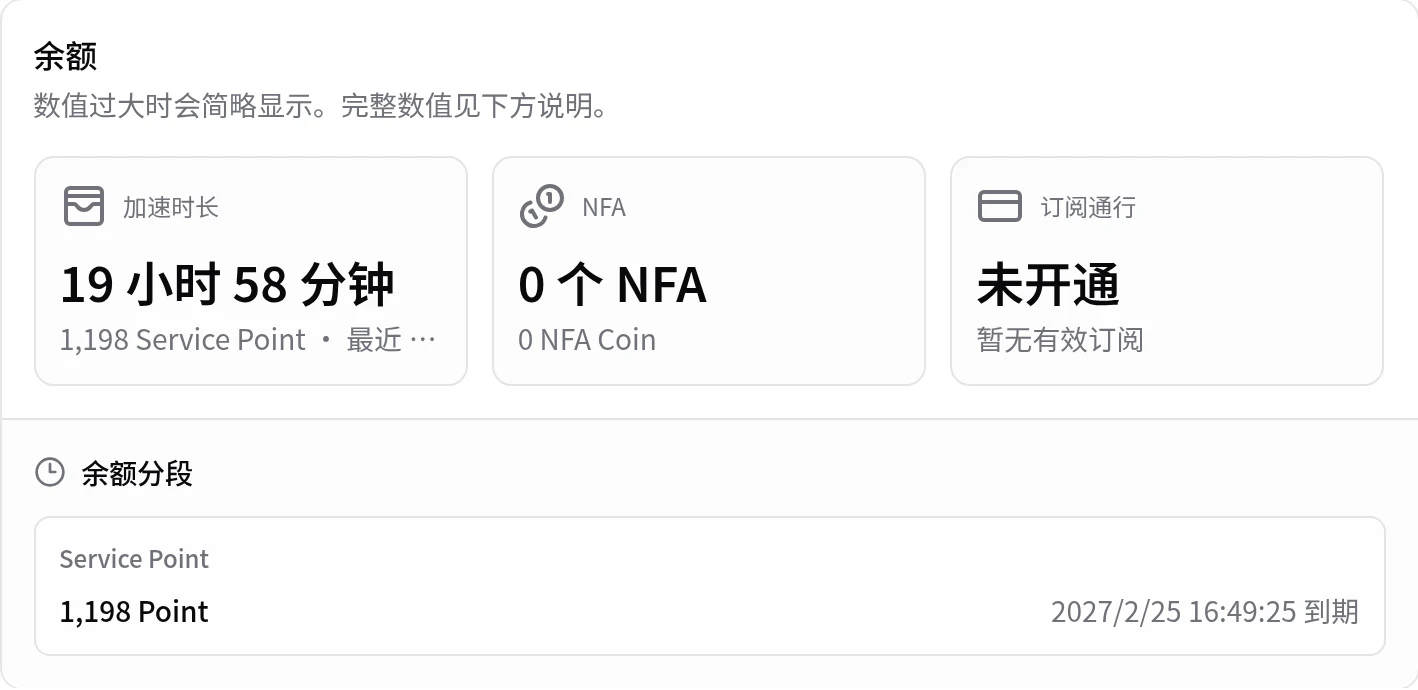
Acceleration has two billing methods: subscription and pay-as-you-go. Pay-as-you-go balance is counted in Service Point, shown as acceleration time on the page. Platform AutoNFA uses NFA Coin separately. You can view current balances, expiry dates, session prices, and usage records in the User Center.
What each balance does
| Item | Purpose | How you use it |
|---|---|---|
| Subscription (acceleration) | Use acceleration services covered by the subscription | Use directly while the subscription is valid |
| Service Point (acceleration) | Use acceleration for the actual time | Deducted by usage time and the service multiplier |
| NFA Coin (AutoNFA) | Use platform AutoNFA | Deducted when the page says it is required |
The three balances are separate. Enough NFA Coin only means that you can use platform AutoNFA. To use acceleration, you still need an eligible subscription or enough Service Point.
Subscription or pay-as-you-go?
Choose for your play pattern:
| Your play pattern | Suggested method | Reason |
|---|---|---|
| You play sometimes or play only briefly | Pay-as-you-go | You pay for the time you use. It is more flexible. |
| You play almost every day or often stay online for a long time | Subscription | It is easier to manage for frequent use. |
Before you buy a subscription, confirm that it covers the services you use. If you are unsure, use pay-as-you-go first, then decide after you have played for some time.
You do not select a billing method when you start. If the account has an eligible subscription for the service, it is used. Service Point is used only when no eligible subscription exists.
How acceleration is billed
When the selected service is covered by your subscription, the active subscription is used. When it is not covered, Service Point is used: the deduction follows your usage time and the multiplier on the page, with a one-minute minimum. At a 1.00x multiplier, one minute deducts 1 Service Point.
Platform AutoNFA uses NFA Coin separately. These cases do not deduct NFA Coin:
- You use your own account.
- You use your free first-use trial.
- You reuse a previous NFA that is not banned and remains available.
- You use an available free quota for non-Hypixel servers.
See Platform AutoNFA for the complete AutoNFA guide.
When billing starts and ends
After you select Start, FisProxy prepares the route first. Billing starts only when the page reports a successful start and shows entrance addresses.
- Continue to wait while the page says that it is processing.
- After an IP change, the page confirms when the new route is active.
- Selecting Stop ends billing immediately and records the session charge.
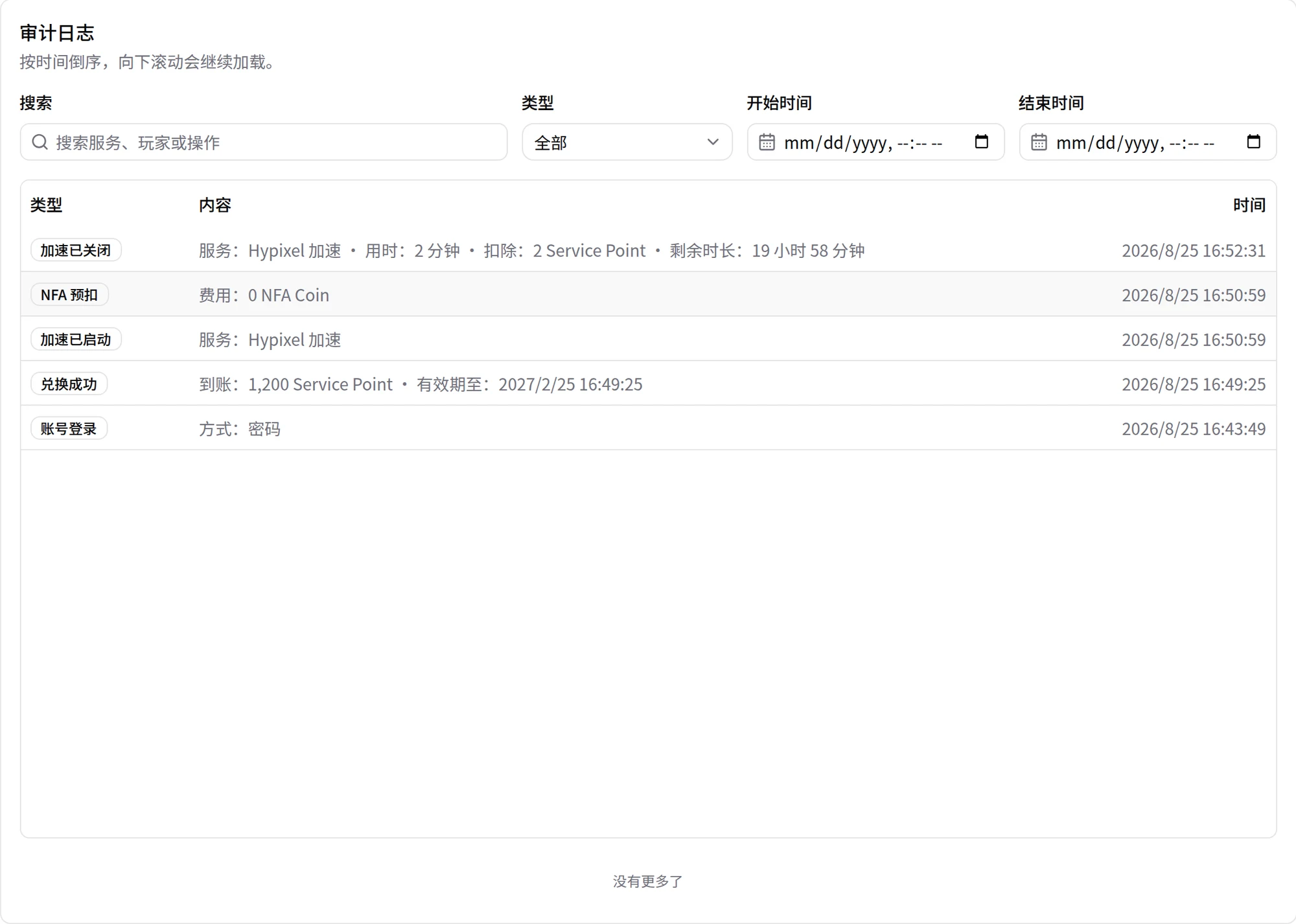
- The History page and balance records are the source of truth for final times and charges.
The History page records each redemption, start, stop, and deduction:
Automatic stop after you go offline
Automatic stop helps prevent forgotten sessions. It is not a free pause function.
| Time | System message or action | Billing |
|---|---|---|
| About 10 minutes after leaving a server | It reminds you that you have not reconnected. | Acceleration continues. |
| About 20 minutes after leaving a server | It stops acceleration automatically. | The offline wait time can still be billed. |
| About 35 minutes after starting, if you never joined | It stops acceleration automatically. | Time after the route becomes active can still be billed. |
Stop the service yourself after you finish playing. This is the simplest choice.
For two minutes after you successfully join a server and billing starts, you may not be able to stop the service. Follow the page instruction and try again later.
Redeem a code
Enter a redeem code in the redemption area on the Account page to receive its Service Point or subscription. After redemption succeeds, the balance refreshes immediately, and the balance area shows the received content and expiry.
- Service Point from redemption expires six months after the redemption date.
- NFA Coin from redemption expires 90 days after the redemption date.
- If you redeem a subscription while the current subscription remains valid, new days extend from the original expiry date. Otherwise, the new subscription starts at redemption time.
- The redemption confirmation and the Account page show expiry for other balance types.
You can buy or redeem through these entry points:
- FisProxy Shop
- The redemption area on the User Center Account page
- The bot
/redeemcommand
Buy redeem codes only through official channels. Do not use a code from an unknown source or one that someone else has redeemed.
Top up NFA Coin
The NFA top-up area on the Account page shows the current ratio, amount range, and payment methods. Follow the page instructions.
NFA Coin balances have these limits:
- Newly credited NFA Coin, including top-ups and redemptions, stays valid for 90 days from the credit date and cannot be used after it expires.
- While your NFA Coin balance exceeds the equivalent of 50 CNY, you cannot top up. Spend the existing balance first.
- NFA Coin received before this policy took effect expires on December 31, 2026 (end of day, Beijing time).
After you create an order, check payment status in the recent orders list. If you paid but the balance did not update, use the order query or self-service check first. Do not pay again. If the balance still does not arrive, give support the order number and payment time.
Refunds and charge checks
If a platform NFA itself cannot be used and meets the refund rules, NFA Coin returns automatically and appears in balance records. Ordinary network disconnections, server kicks, penalties caused by player behavior, and free NFAs that did not deduct NFA Coin do not cause an automatic refund.
If you have a question about a charge, check these items in order:
- View the acceleration start and end times on the History page.
- Confirm whether the session used a subscription, Service Point, or NFA Coin.
- Check whether balance records already show a refund.
- If you still need help, submit the acceleration time, order number, or screenshot in My Tickets in the User Center, or follow Contact and support.
Learn more
NEXT / KEEP EXPLORING
Continue to explore.